Local administrator removal and protection
Applies to client 2.0.x and later. For tenant admins, auditors.
AdminExplorer gives users administrator rights per program, on demand. Local administrator removal and protection completes that: standing membership of the local Administrators group (and other privileged local groups) is removed and kept removed, with full visibility in the portal. Users who lose their admin rights keep working and use AdminExplorer for the programs that need them; the tray tells them once: “Local admin: removed by policy”. Both tiers.
Where to manage it
Section titled “Where to manage it”- Settings, Local Administrator Removal & Protection: the mode, the protected groups, the allowed members (with presets) and security group auditing.
- Local admins: the compliance overview, every member that is not allowed (with Add exception and Allow everywhere), the mode switch with its preview, exceptions, repeat offenders and the devices.
- A device’s Local admins tab: the members of each protected group, the device’s own verdict next to the portal’s, what enforce would remove, a mode override for that device, and the history (for auditors and tenant admins).
Every change made here is recorded with your name in the local admin history.
Protected groups
Section titled “Protected groups”The local Administrators group is always protected. You can also protect Remote Desktop Users, Backup Operators, Hyper-V Administrators, Network Configuration Operators, Power Users, Remote Management Users and Distributed COM Users. Groups that are not protected are left alone.
| Mode | Behaviour |
|---|---|
| Off | No inventory; the device’s current state is deleted from the portal |
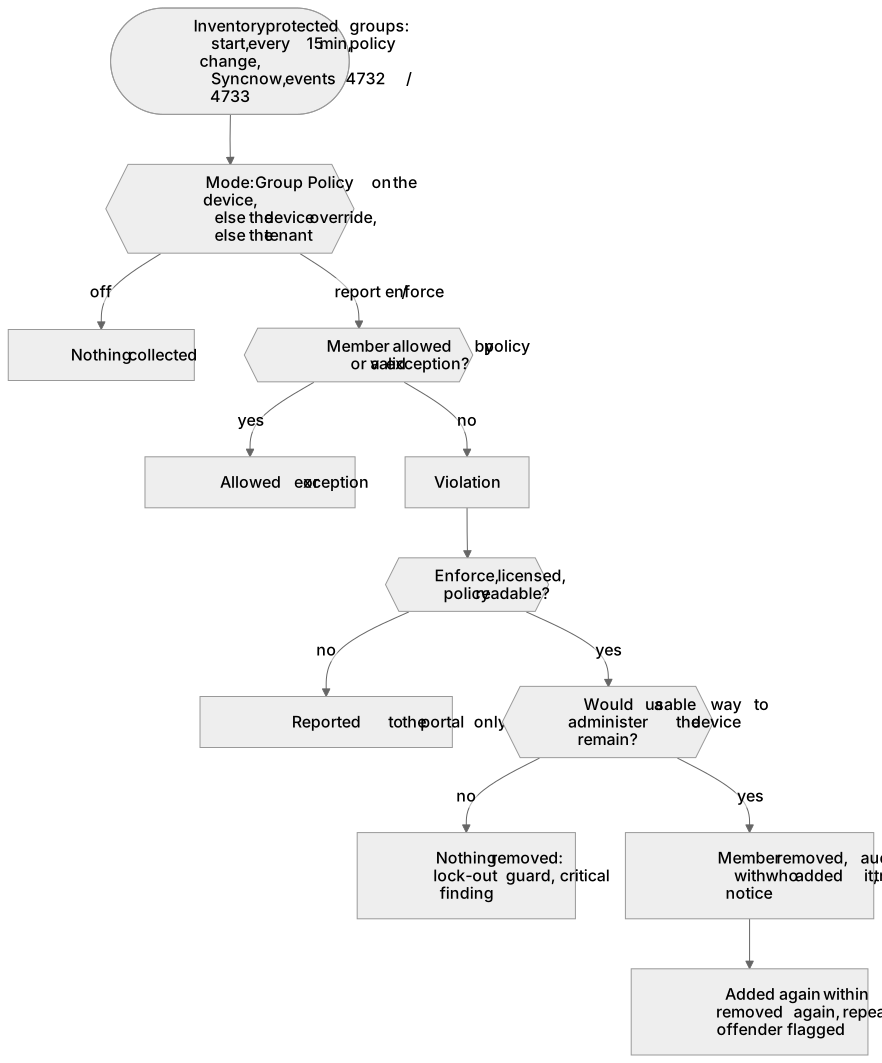
| Report | Inventory and findings only; nothing is removed. Start here. |
| Enforce | Members that are not allowed are removed from the protected groups |
- A device can have its own mode (for example Report for one sensitive device while the tenant enforces, or Enforce on a pilot device first).
- A mode set by Group Policy on the device itself wins over the portal. The portal shows such a device as Overridden on device.
- A device without a valid license only reports.
- A policy line the device cannot use (for example an allowed entry it cannot read) makes it report only until the policy is fixed, so a mistake never removes more than intended.
Allowed members and presets
Section titled “Allowed members and presets”Members are matched by SID. You can allow:
| Type | Value |
|---|---|
| SID | Any account or group SID. SIDs that stand for nearly everyone (Everyone, Users, Authenticated Users, Domain Users and similar) are refused. |
| Entra group | The group’s object id; it is matched as the group’s S-1-12-1 SID |
| Entra role | Global Administrator or Microsoft Entra Joined Device Local Administrator. These need Directory Sync (Settings, Entra group targeting) so the portal can read the role’s SID in your directory. |
| Domain group | DOMAIN\Name (resolved on the device inside its own domain) or the group’s SID; groups of other domains or forests as SIDs |
| Built-in | The built-in Administrator (RID 500), SYSTEM, the AdminExplorer emergency account, or Domain Admins of the device’s domain |
An allowed member can apply to every protected group or only to some of them.
Presets add what is missing and keep what is there:
- Entra-joined default: the built-in Administrator plus the Global Administrator and Entra Joined Device Local Administrator role SIDs.
- Hybrid default: the same plus Domain Admins.
While an Entra role cannot be resolved (Directory Sync not connected, the role not activated, or the permission to read roles missing), devices get Report instead of Enforce, and the Local admins page says why. Allow everywhere on a member of a device adds that exact SID instead; it works without Directory Sync.
Exceptions
Section titled “Exceptions”An exception allows one account on one device until a date, with a reason (at most a year ahead). Tenant admins create them from the list of members that are not allowed. An expired exception is enforced again; expired exceptions leave the list 30 days later. Devices receive only their own exceptions, without names or reasons.
Preview and confirmation
Section titled “Preview and confirmation”Preview what enforce would remove lists, per device, the members enforce would remove now, from each device’s latest report and the current policy. A device kept in Report or Off is listed as not enforced. A device with an older AdminExplorer client shows Needs a newer client: the portal cannot predict it, the device still decides safely.
The portal asks you to confirm, with the preview totals, whenever a change makes enforce remove members: switching the tenant or a device to enforce, removing a device’s Report override, adding a protected group, removing or narrowing an allowed member, or removing or shortening an exception while a device enforces.
The lock-out guard
Section titled “The lock-out guard”Before removing anything from Administrators the device works out what would remain. At least one of these must be left:
- a usable built-in Administrator (enabled, not locked out, not expired);
- the AdminExplorer emergency account, while enabled;
- an Entra account or role on a device that is Entra joined only;
- a domain account or group on a domain-joined device;
- a usable local user;
- INTERACTIVE, Authenticated Users, Everyone or REMOTE INTERACTIVE LOGON.
If none would remain, the device removes nothing from Administrators and reports a critical Lock-out guard finding (also shown in Report mode as a preview). SYSTEM, the built-in Administrator and the emergency account are never removed. A device removes at most 50 members per pass, and nothing from a domain when an allowed domain group could not be resolved.
Protection
Section titled “Protection”The device checks its protected groups at start, every 15 minutes, after every policy change, on Sync now and when a member is added or removed (Security log events 4732 and 4733, when auditing of security group management is on; otherwise the 15-minute check finds it). Turn on auditing of security group changes in Settings lets the device enable that auditing itself; it turns it off again only if it turned it on.
A removed member that is added back within 24 hours is removed again. The second re-add by the same account within 24 hours flags a repeat offender; the portal also lists accounts that re-added removed members 3 times or more in 30 days. When the device knows who added a member (event 4732 of the last hour), the history shows it.
Audit and history
Section titled “Audit and history”- Every removal, failed removal, violation that was not removed and lock-out guard is an audit record (kind localAdminRemoval) and an event in the device’s Application log (1030 removed, 2030 not removed, 2032 repeat offender, 3030 removal failed, 3031 lock-out guard).
- The local admin history (auditors and tenant admins) adds members that joined or left, re-adds and every change made in the portal.
Privacy and retention
Section titled “Privacy and retention”- The portal stores the members of the protected groups (SID, name, type, status) and the device’s findings; nothing else from the device.
- The current state of a device is deleted when the device is revoked or its mode becomes Off. The history is kept for 400 days, like the audit, then deleted.
- Deleting the tenant deletes everything.
Related guides
Section titled “Related guides”AdminExplorer documentation, published by Circle of Bytes ApS. Customers sign in at portal.adminexplorer.circleofbytes.com.